| Other programs and utilities |
|
|
| |
Adding of new archiver |
01.08.2000 |
Step 1. Click Settings, click Archiver tab, and click Add button.
Program settings. Archivers
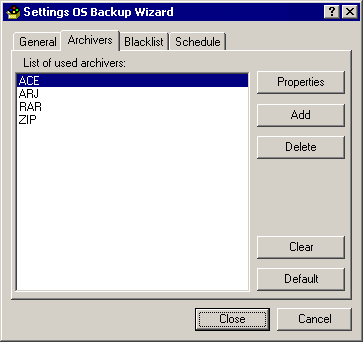
Step 2. Specify the following parameters:
- Archiver name.
- Path to archiver.
- If a backup copy will be unpacked by another program, you need to specify path for it too.
- Filename extension of backup archive.
- Options for packing with recurse subdirectories.
- Options for unpacking files with full pathnames and updated files (new and newer).
- Filelist.
|
Archiver settings
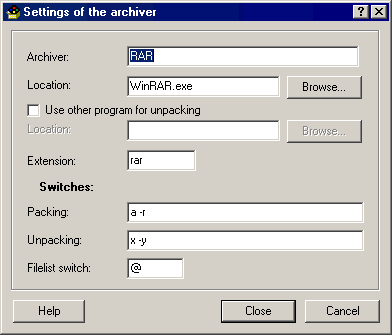
Step 3. Click Close button if it is all correct or Cancel button to cancel adding of new archiver.
Step 4. Click Close button for other actions.
Remarks about archivers.
- ARJ. Use ARJ 2.55 or later.
- RAR. Use WinRAR 2.70 or later.
- ZIP. Use PKZIP 2.50 or later, or download WinZip(R) Command Line Support Add-On.
© 2024 Rising Research. All rights reserved.


 OS Backup Wizard