| Other programs and utilities |
 |
Digital Video Repair
Small utility for repairing (fixing) AVI files.
|
 |
DivX2Mp4
Small utility for converting AVI-files of a format MPEG4, compressed Microsoft MPEG4, DivX 3(4&5), Angel Potion, XviD and 3ivx. |
 |
Video DeNoise
The filter for clearing the video of noise for VirtualDub and Adobe Premiere.
Its main task is suppression of noise as small bright lines, red, blue or green colors. |
|
| |
| Restoration of backup copy |
Updated: 01.08.2000 |
Step 1. Run OS Backup Wizard. Double-click the icon on Desktop or click Start, point to Programs, and then click OS Backup Wizard.
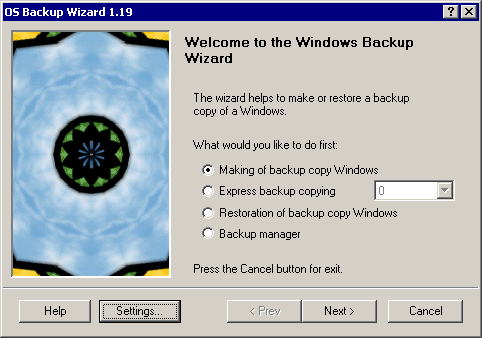
Main window
Step 2. Click "Restoration of backup copy" and click the Next button.
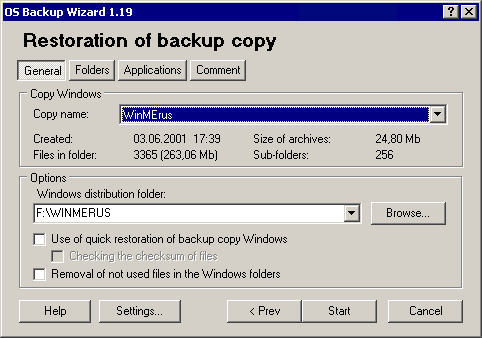
Restoration of backup copy. General tab
Step 3. General tab. Specify here:
- Copy name.
- If necessary set the folder of distribution Windows.
- Check options "Use quick restoration of backup copy" and "Checking the checksum of files" for quick restoration of backup copy.
- Check an option “Removal of not used files” for removing not necessary files.
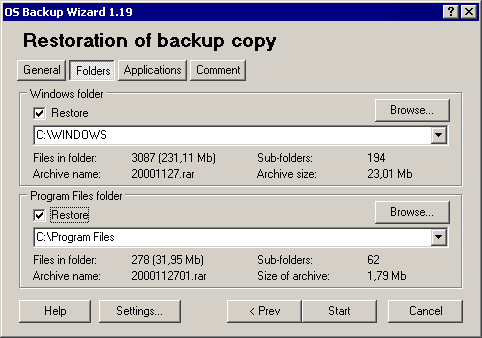
Restoration of backup copy. Folders tab
Step 4. Folders tab. Mark restored folders and specify for them complete paths.
Step 5. Click the Finish button for begin restoration of backup copy.
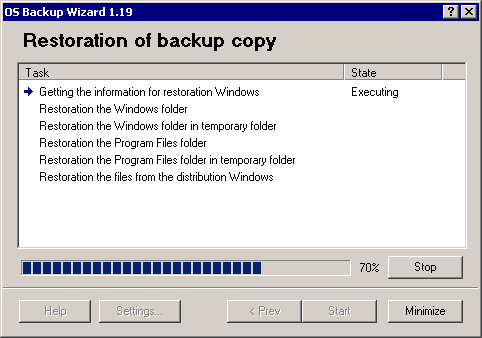
Restoration of backup copy
Step 6. If you want to break the process, click the Stop button.
Step 7. At the end of backup copying click the Close button for exit from program or the Back button for other actions.